
 Zapdtf Printing
 2025-12-12
 2 min
2 min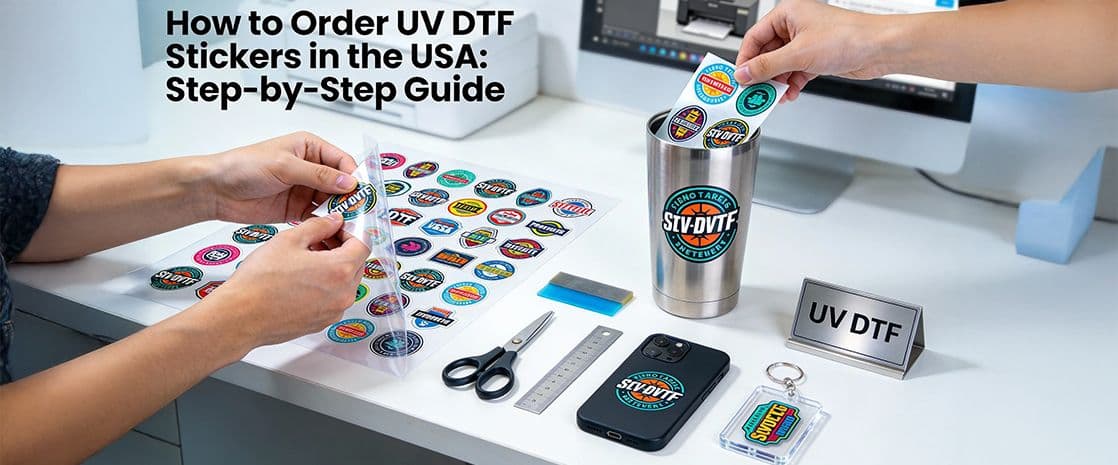
In the fast-growing world of custom product decoration, UV DTF transfers are one of the easiest ways to get vibrant, durable designs onto hard surfaces like glass, metal, acrylic, tumblers and phone cases. If you are looking to order UV DTF stickers in USA for your brand or small business, this step-by-step guide will help you place the perfect order on the ZAPDTF website.
What Is UV DTF Printing?
UV DTF (Ultraviolet Direct to Film) printing is basically the process of printing UV-cured inks on a specially made transfer film and then giving the product a simple peel-and-stick application. As the ink is cured with UV light, it forms a very tight, hard, scratch-resistant layer that can be brought to smooth surfaces without the aid of a heat press.
Since the designs are first printed on a uv printing transfer film, one can buy uv dtf transfers ready-made and just put them on the likes of cups, phone cases, keychains and signage with a minimal set of equipment. Therefore, UV DTF is the right choice for crafters, small businesses and promotional product sellers who are after pro-level results but want to avoid the large printers investment.
Why Choose UV DTF Stickers?
Ordering uv dtf transfers has several advantages over traditional vinyl, screen printing or direct printing. Some of the main benefits include:
Some of the main benefits are:
- Long-lasting: Inks that are cured with UV light are very resistant to scratches, fading and are waterproof are the best choice for items that are frequently handled.
- Bright color and sharpness: The process can reproduce gradients, very thin lines and even small text with perfect resolution.
- Strong adhesion to hard surfaces: UV DTF is the solution on the glass, metal, ceramics, some plastics and coated wood where standard ways are hard to work.
- No special press required: You can order UV DTF prints, receive them on transfer film and simply peel and apply with firm pressure on a clean surface.
For businesses in the USA, the ability to order uv dtf stickers usa online means quick turnaround and professional-quality branding on a wide range of products.
Step 1: Prepare Your Artwork
Before you order uv dtf stickers usa, start with clean, high‑resolution artwork. Most printers recommend:
- Vector files (PDF, PNG) or high‑resolution PNG with transparent background at 300 dpi or higher.
- Colors set to RGB for digital printing with text converted to outlines to prevent font issues.
- A clear understanding of final size, especially for small items like pens or narrow bottles.
If you plan to use a uv dtf gang sheet (multiple designs arranged on one larger sheet), organize your designs tightly to maximize space and reduce cost. Gang sheets are perfect when you need many small logos, label sets or variations in one order.
Step 2: Choose the Right UV DTF Product
On a site like zapdtf.com, you will typically see several UV DTF options, and choosing the right one is crucial. Common choices include:
- Single-design UV DTF transfers: Best when you want one logo or design repeated in a fixed size.
- UV DTF gang sheet: A large sheet (for example 22" x 60") where you place multiple designs, sizes and variations in one print.
- Custom uv dtf transfer for specific products: Options tailored to items such as phone cases, tumblers or nameplates.
If you plan frequent branding projects, buying a larger uv dtf gang sheet and filling it with multiple logos and labels is usually more economical than ordering small individual pieces.
Step 3: Select Size, Quantity and Finish
Once you pick the product type, set the technical details for your order uv dtf prints:
- Dimensions: Enter the size of each sticker or the size of your full uv dtf gang sheet (height and width).
- Quantity: Decide how many sheets or copies you need, factoring in test pieces and future orders.
- Finish and white ink: Many providers let you choose how white ink is used under your design to keep colors opaque on dark or transparent surfaces.
If you are unsure, start with a smaller quantity to test adhesion and color on your specific products before you buy uv dtf transfers in bulk.
Step 4: Upload Artwork and Arrange Your Gang Sheet
For a UV DTF gang sheet, most printers offer either:
- An online designer where you can drag, resize and arrange multiple images on the sheet, or
- A template (PDF/PNG) to download, fill in with your layout and upload back as one file.
When arranging your designs:
- Keep at least a small margin between each design to allow for easy cutting.
- Group similar sizes together so you can cut strips or blocks efficiently.
- Double‑check that no elements are outside the safe print area.
This careful layout ensures you get maximum value from every uv dtf gang sheet you order.
Step 5: Review Proofs and Confirm Your Order
Before production starts, reputable print shops will show you a digital proof or preview of your custom uv dtf transfer sheet. This is your chance to:
- Verify spelling, logos and colors.
- Check sizes and placement on the gang sheet.
- Confirm the total quantity and price.
Take a moment to compare the preview to your original plan and make sure everything looks correct before you finalize your order uv dtf stickers usa.
Step 6: Receive and Apply Your UV DTF Transfers
When your order arrives, you will receive printed designs on uv printing transfer film, often labeled as A/B film depending on the system used. Application is usually straightforward:
- Clean the surface: Beforehand if necessary wipe the area with isopropyl alcohol and let it air dry.
- Cut out the design: Cutting close to the edge is recommended especially when working with a gang sheet, if it is necessary.
- Position the transfer: Carefully place the film onto the item, making sure that the alignment is correct.
- Apply pressure: The transfer can be pressed firmly with the help of a finger, a squeegee or a few fingers and a squeegee; no air bubbles should be left between the transfer and the surface.
- Peel the UV DTF film: The top film should be peeled off slowly and at a low angle, leaving the cured ink firmly attached to the surface.
No heat press is required in most UV DTF systems; the strong adhesive and cured ink handle the bonding.
Tips for Getting the Best Results with UV DTF
To get the most from every custom uv dtf transfer you order:
- Test first: Apply one transfer to a sample surface to see color, adhesion and durability before using on expensive blanks.
- Use smooth, non‑porous surfaces: UV DTF performs best on glass, metal, ceramics, coated wood and certain plastics. Rough or textured surfaces can reduce adhesion.
- Avoid harsh chemicals early: Give the design time to fully set on the surface before exposing it to strong cleaners.
When you buy uv dtf transfers from a reliable USA printer like ZAPDTF Printing, you gain a flexible, professional way to brand your products, gifts and promotional items without investing in your own UV printer. By following these steps from artwork preparation to application - you can confidently order uv dtf prints that look sharp, last long and showcase your brand at its best.